Giveaway Win 1 month of Appcognito Pro, free. Free entry, one per person. Enter now

Free app blocker for Android

Ghost your distractions.

The private app blocker for Android. Block apps, sites and words on screen, and choose how hard it pushes back. No account. Nothing leaves your phone.

  • Free forever plan
  • No account
  • No ads, no tracking
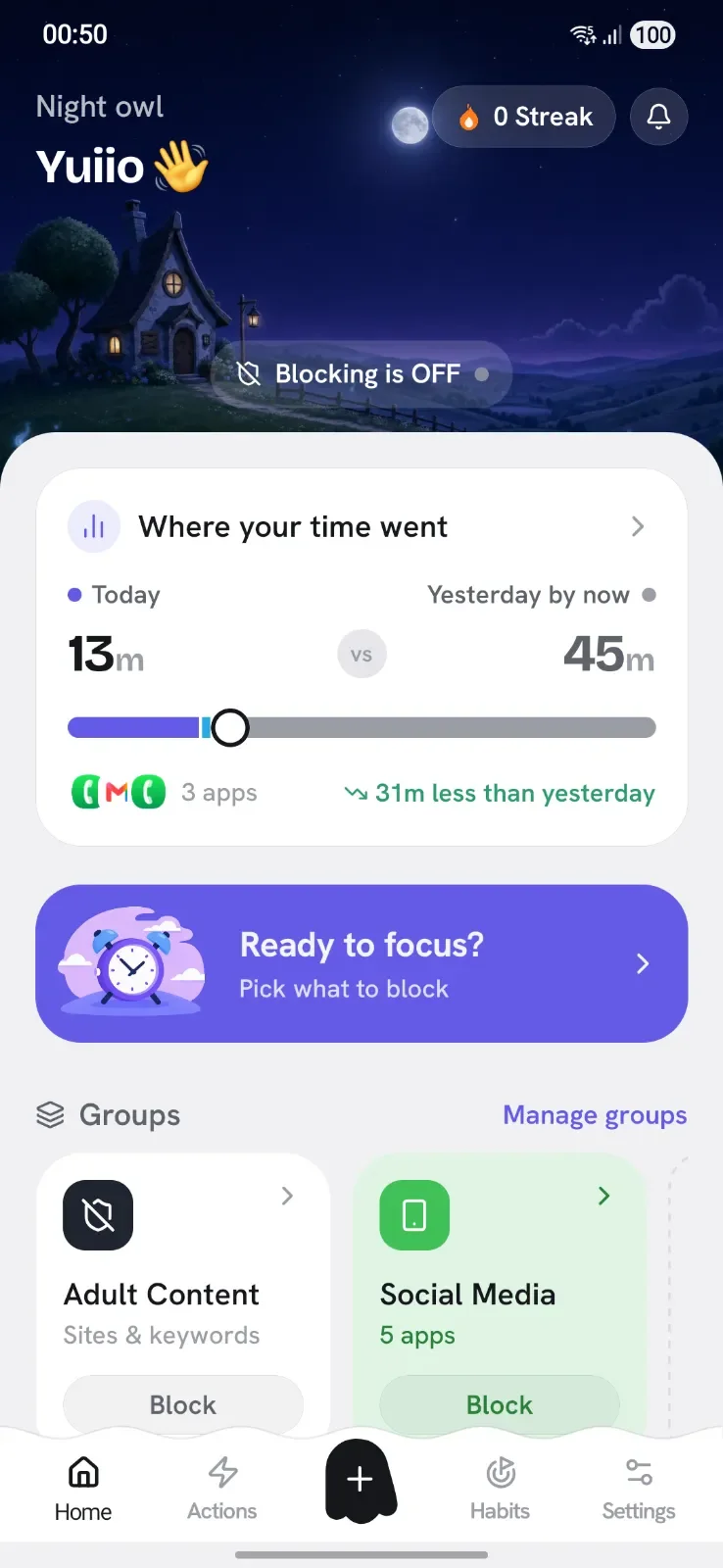
The Appcognito home screen

Not every app needs a wall.

Choose how hard Appcognito pushes back, from a quiet nudge to a full stop. Mix them per app.

  • Block

    Stop the app opening at all.

  • Cut internet

    It opens, but nothing loads.

  • Slow

    Throttle it until the feed stops being fun.

  • Mute

    Its notifications vanish as they arrive.

  • Dim

    Darken it so it is less tempting to stay.

  • Pause

    A game or a breath before every unlock.

Six ways to block.
Use one, or all of them.

Every way blocks the same apps, sites and words. They differ in when it starts and how long it holds.

Aurith, the Appcognito mascot
Quick Block

Block anything in a single tap

The fastest way to slam the door on a distraction. Tap a block list, app or site to block it, tap again to let it back in. No menus, no setup, instant relief.

  • Tap to block apps and entire websites on the spot
  • Cut an app's internet, or stop it opening at all
  • Put a one-tap block widget on your home screen
Appcognito Quick Block screen
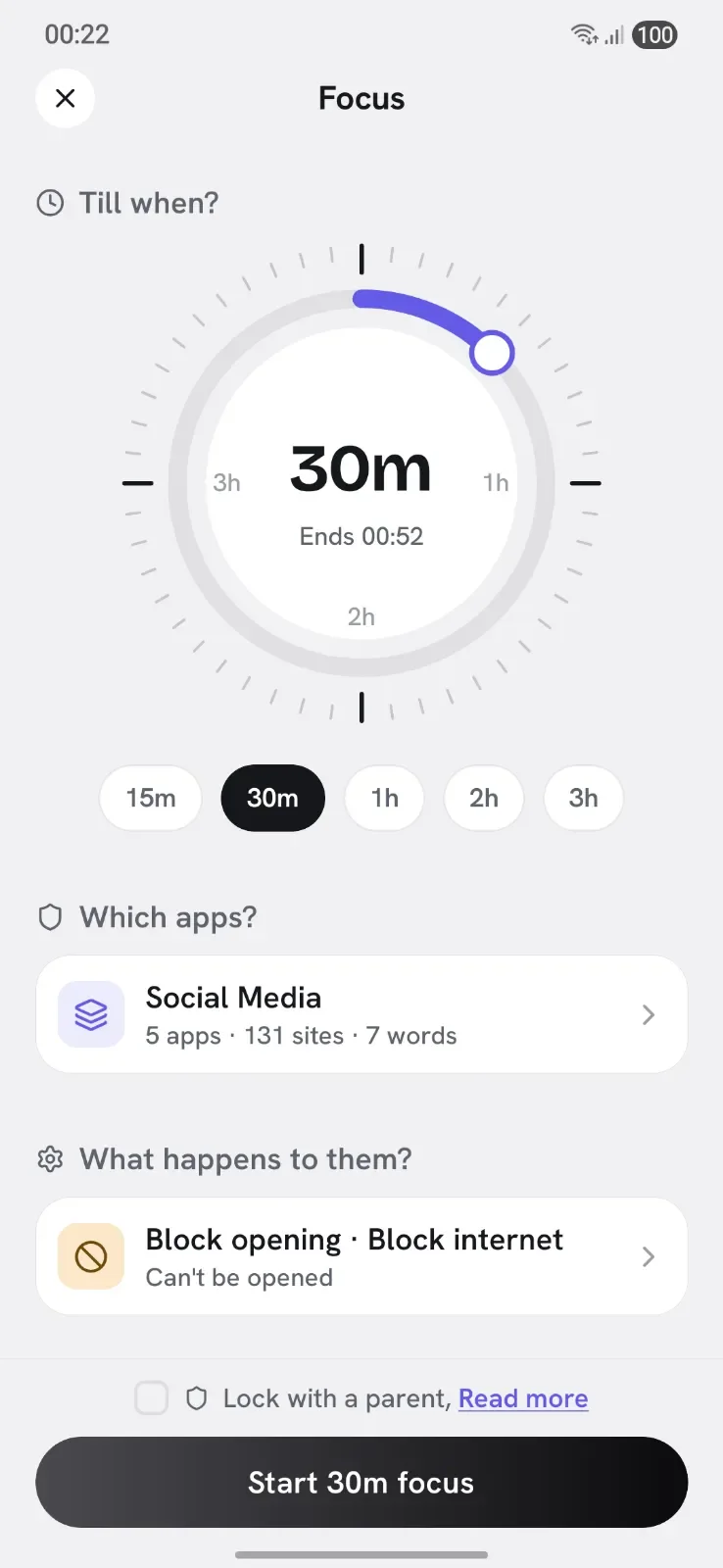
Focus

Drop into deep work and lock the door

Start a timer and Appcognito seals off the apps, sites and keywords that pull you away, until the session ends. Lock it so the first urge to quit cannot win.

  • Set a duration and block distractions until time is up
  • Lock a session so you cannot bail early
  • Hand the key to a parent or partner for real accountability
Appcognito Focus screen
Rules

Set it once, let your phone hold the line

Blocking on autopilot. A rule is a trigger plus what it blocks, and it runs by itself. Sixteen triggers cover schedules, usage limits, places, networks and more.

  • Trigger by time, usage, screen time, place, network, movement and 11 more
  • Take a forced break after too long on an app or too much screen time
  • Keeps working when Appcognito is closed, even after a restart
  • Time
  • Monthly dates
  • Wake-up
  • App usage
  • Screen time
  • Open limit
  • Pomodoro
  • Meetings
  • Charging
  • Battery
  • Screen
  • Wi-Fi
  • Bluetooth
  • Location
  • Movement
  • Off topic
Appcognito Rules screen
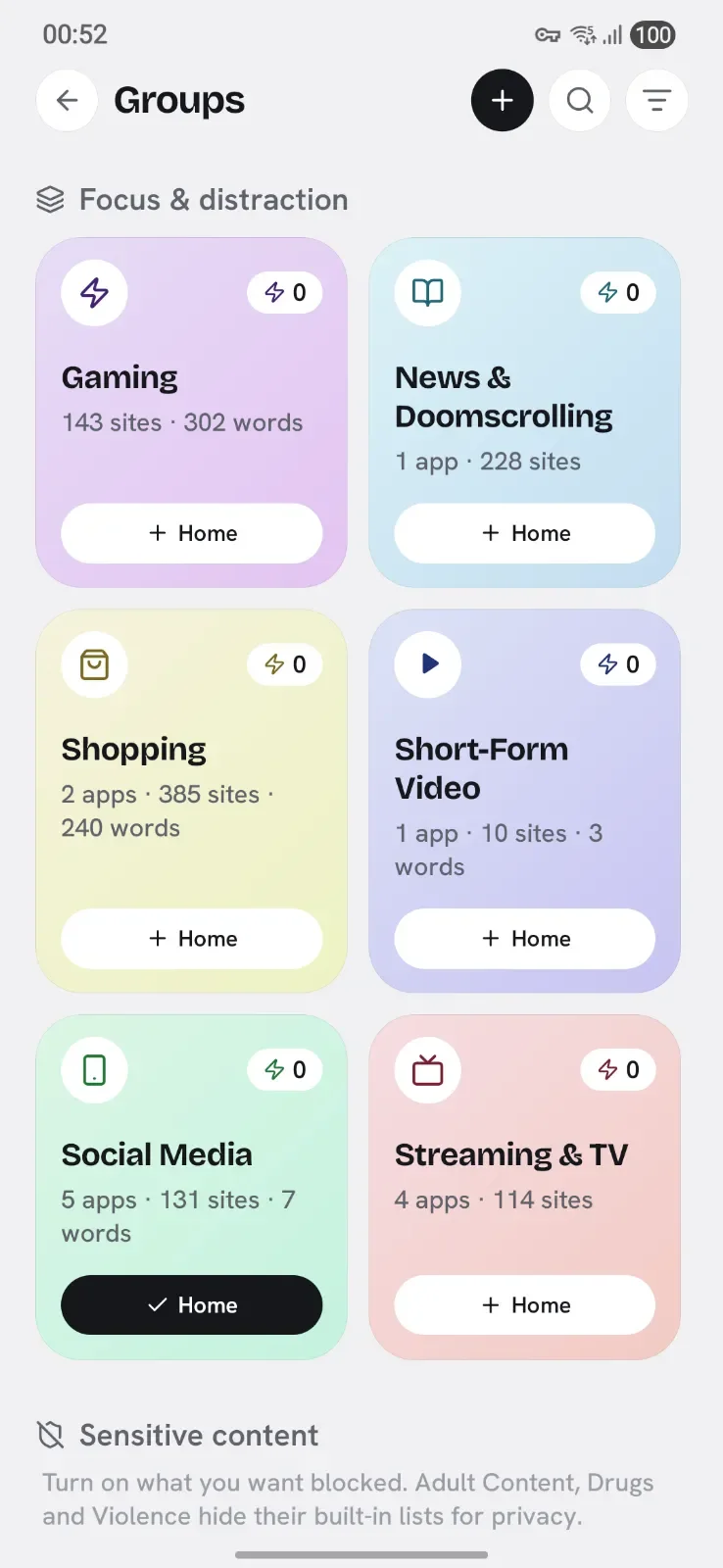
Block lists

Bundle your distractions, flip them off together

Put apps, sites and keywords in a block list like Doomscrolling, Gaming or Sleep, then switch the whole list on in one tap. Eleven ready-made block lists get you blocking in seconds.

  • Seven editable starters: social, short-form video, gaming, shopping and more
  • Four locked safety lists covering adult, gambling, substances and gore
  • New apps you install can be added to a block list automatically
Appcognito Block lists screen
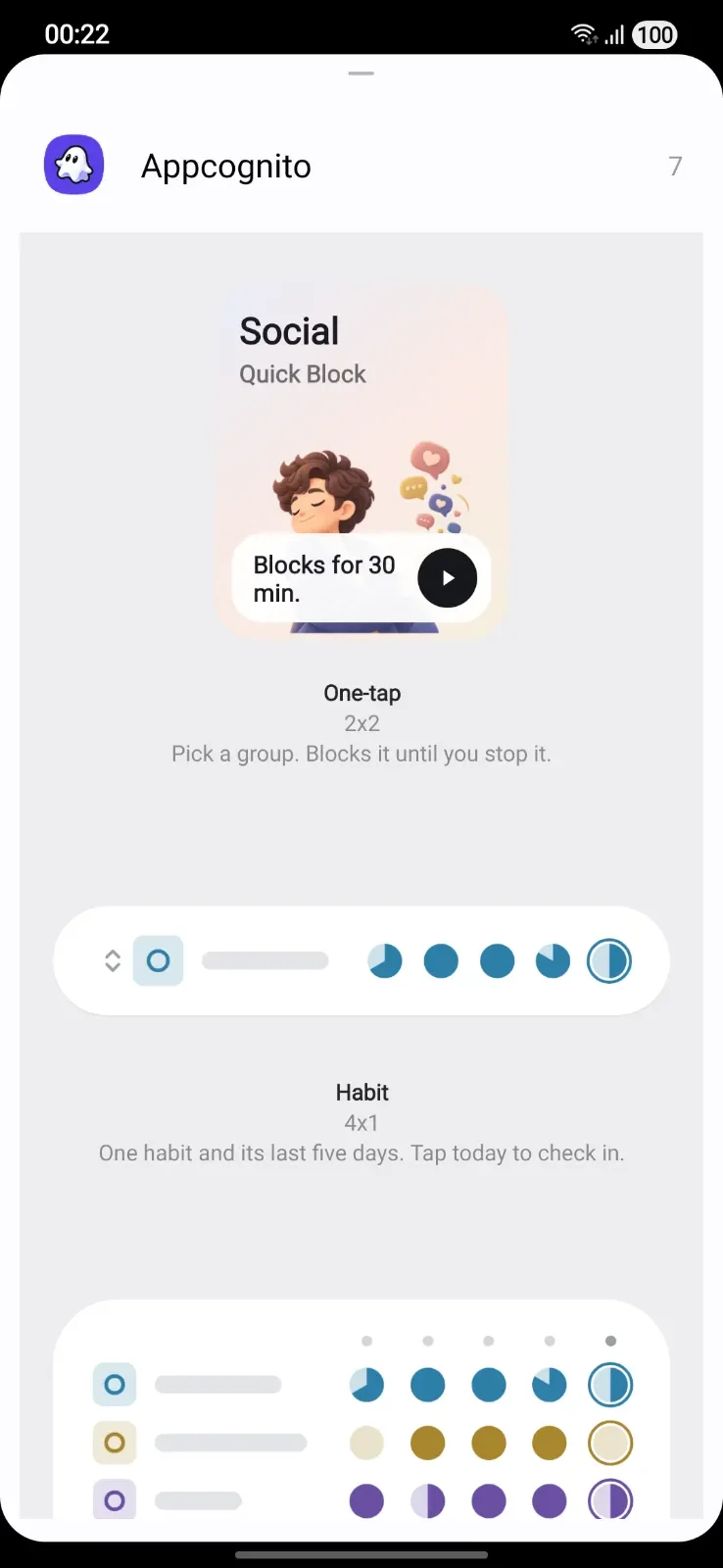
Widgets Pro

Block from your home screen, without opening anything

Two widget kinds sit on your home screen. A Focus widget blocks for a set time then ends on its own; a one-tap widget blocks until you stop it. Either way the block starts before the app does.

  • Tap once to start a timed block, or one that runs until you stop it
  • Each widget carries its own block list, so different widgets block different things
  • The block is running before you could have opened a distraction instead
Appcognito Widgets screen
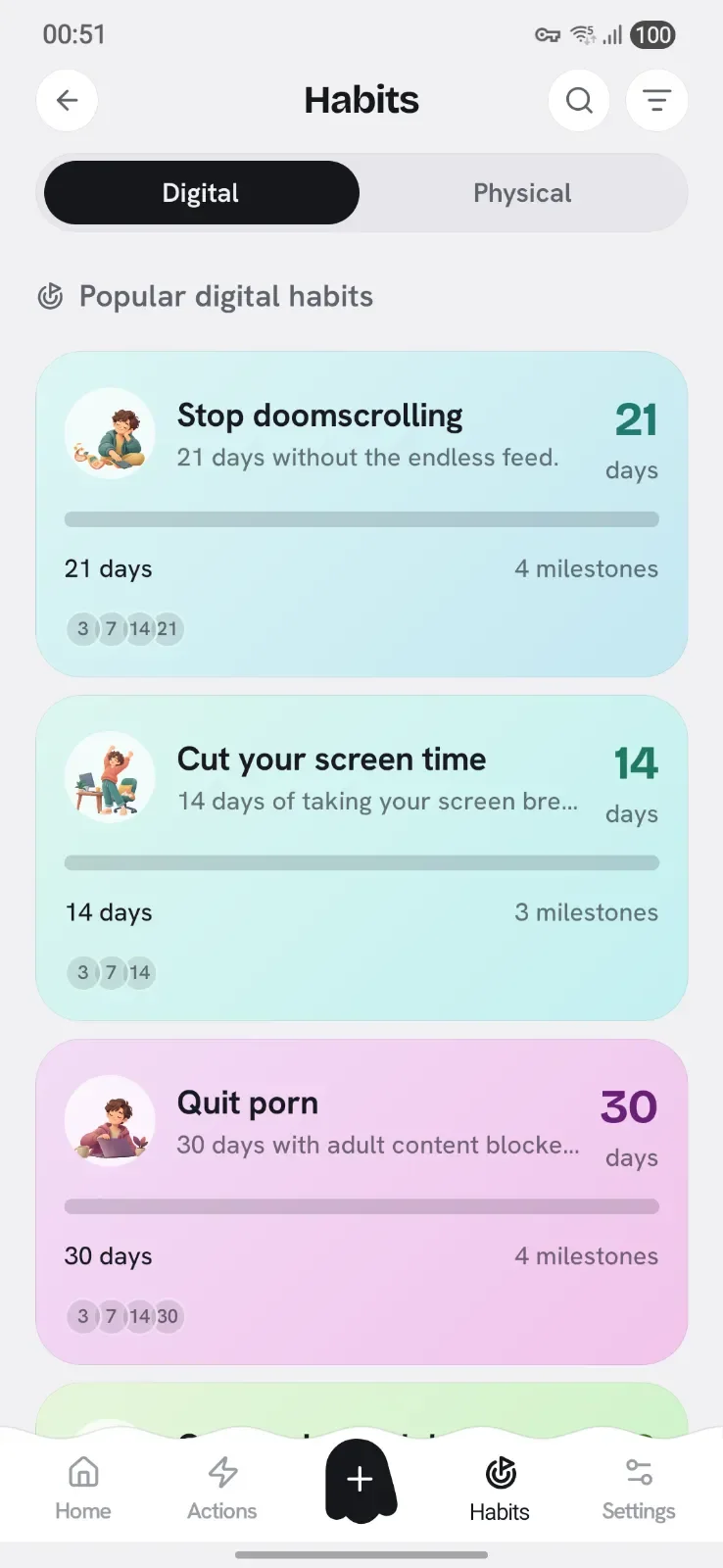
Habits

Turn a good week into something that sticks

A Habit is a promise you keep daily, refereed either by your rules or by your own check-in. Put a term on one and it becomes a Challenge with milestones and a verdict.

  • Digital habits are scored by your rules, with no self-reporting
  • Physical habits like water, gym or reading are a daily check-in
  • Commit to a term for milestones, a countdown and an honest ending
Appcognito Habits screen

Built to hold.

Blocking is easy. Keeping a block on when you want it gone is the hard part.

Aurith, the Appcognito mascot
Unlock

Make the way back slow.

Open a blocked app and Appcognito shows how often you tried today, then asks if you still need it. Getting in takes a short game or a slow breath, and only buys 5, 15 or 30 minutes. Strict mode removes the door.

9:41●●●
Aurith, the Appcognito mascot

Instagram is blocked

"You came here for a reason. It was not this."

7Opens today 1h 12mTime today
Back to Focus
Still need it?

A short game or one slow breath first

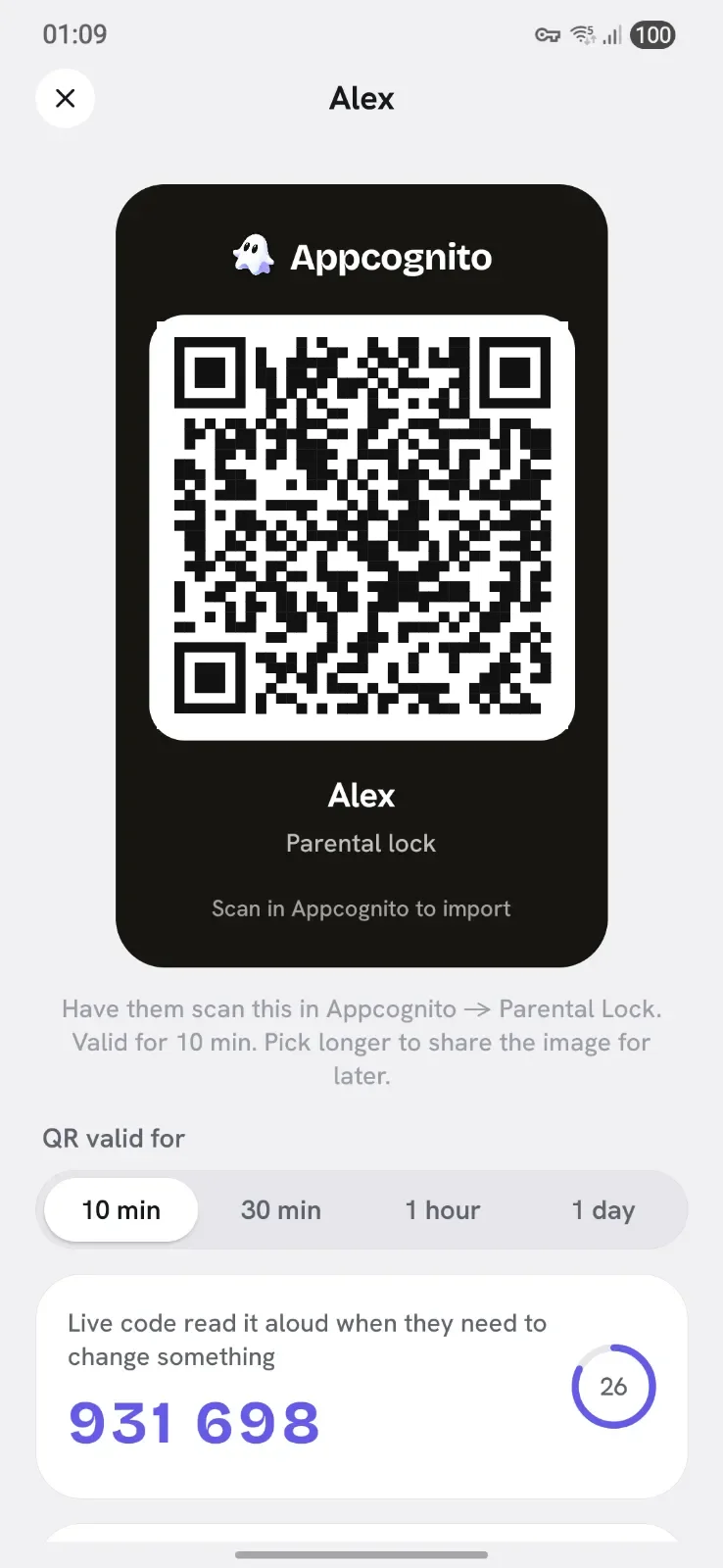
Protection Pro

Lock it so you can't cheat.

Guard your settings with a PIN or fingerprint. Give a partner a code that changes every 30 seconds. Stop Appcognito being uninstalled on a bad night.

How the parental lock works
Appcognito Protection screen
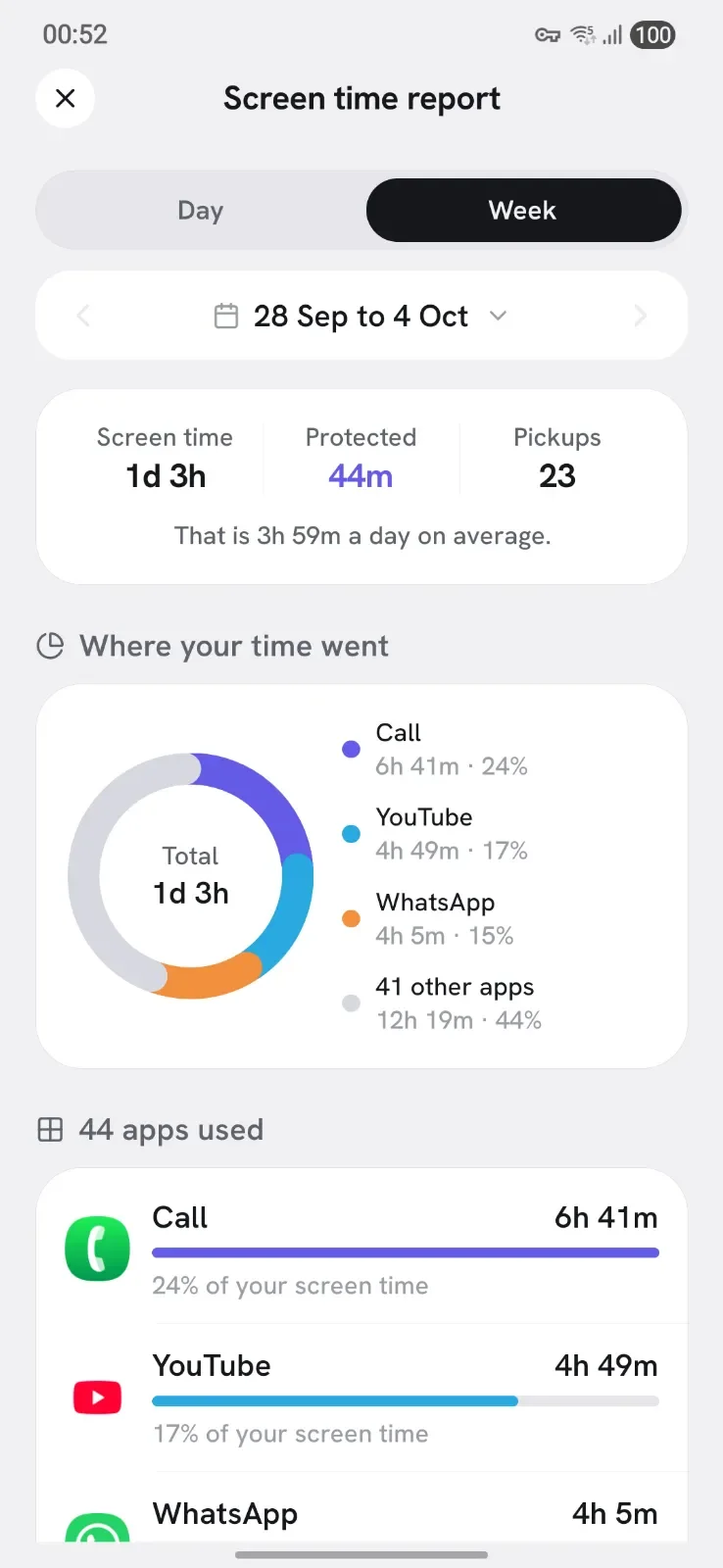
Report

See where the hours go.

A day and week report shows your screen time, pickups and the apps that took the most. Spot a pattern, and one tap turns it into a rule.

Appcognito Report screen
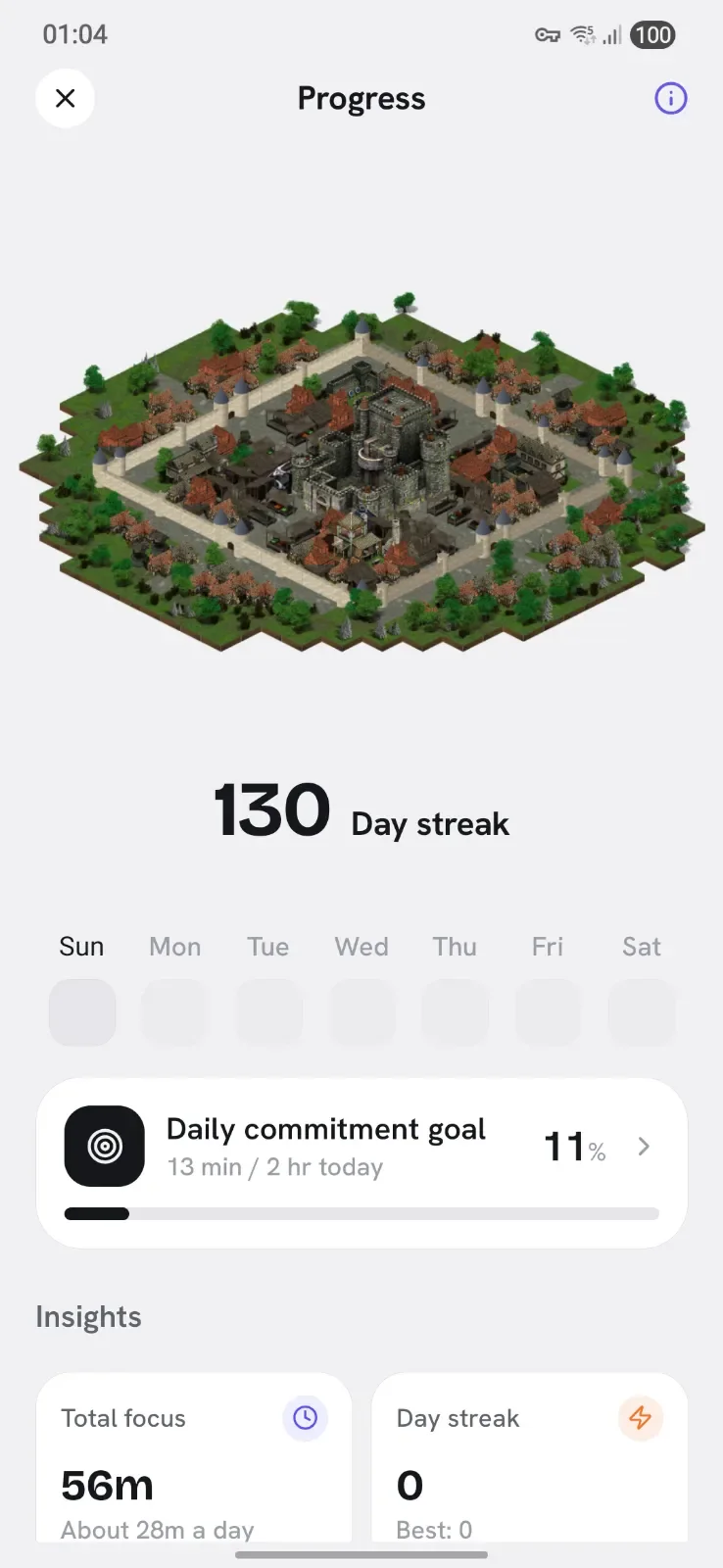
Streaks

Watch the habit form.

A day counts when you keep an hour of blocking. Each one adds to your streak and grows a little kingdom, with trophies along the way. All of it stays on your phone.

Appcognito Streaks screen
A quiet evening over a little house on a hill

Your evenings are yours again.

Every hour you take back is an hour for sleep, people and the things you keep putting off.

New: Tags

Tap a tag, things happen.

Pair an NFC sticker or a QR code and give it one job. Put it where the habit happens.

Switch

Tap at your desk to start Study mode.

Turns rules and block lists on and off together. Tap again when you are done.

Unlock key

Keep it in another room.

A blocked app opens only with the key, so unlocking takes a walk.

Check in

Stick it on your water bottle.

One tap logs the habit. No opening the app, no forgetting.

NFC tag Tap your phone to it, even with the app closed.
QR code We make the code. Print it, then scan it with Appcognito.

Pro A tag is never a way out: it does nothing in Strict mode or under a parental lock. How tags work

The power layer

Serious tools the others charge a fortune for

On top of the six ways to block, you get accountability locks, a real firewall and private stats, the kind of toolkit rivals split across pricey tiers. All of it on-device.

Keywords

Block the search, not just the app

Choose words that start a spiral. Appcognito checks the screen on-device and blocks the moment they appear, in any browser or app.

Accountability

A partner holds the key

Lock a block behind someone you trust, so a weak moment cannot undo your week.

Security

App lock with biometrics

Guard Appcognito behind a PIN and fingerprint, so blocks cannot be quietly switched off.

Aurith

Streaks that motivate

Every focused day lights up. Encouragement from your ghost companion, never shame.

Protection

Uninstall protection

Stops the late-night impulse to delete the app and binge. Reboot-proof, and only you can lift it.

Yours

Export and import your setup

Carry your block lists, rules and keywords to a new phone in seconds. Your configuration belongs to you, never a cloud account.

Block

On-device firewall

Blocks apps and sites locally, even when the app is closed.

Limits

App usage limits

Time-limit an app, cap its opens, then an enforced break.

Breaks

Screen-time breaks

Hit your daily cap and the whole phone steps back.

Focus

Stay on topic (AI)

Reads the screen to tell study from drift, then blocks the drift.

Safety

Adult & gambling blocklists

Locked lists block 1,000,000+ adult and gambling sites.

Private

Private stats

See where your time goes. Numbers never leave your phone.

Discipline

Strict mode

No gate, no pause, no quiet override. Once armed, a block runs its full course.

Stakes

Habits & Challenges

Daily habits your rules referee for you, so there is no self-reporting. Put a term on one and a slip resets the run, so quitting quietly isn't an option.

Block screen

A reminder when it matters

Your own words are waiting on the block screen the moment you tap a blocked app, right when the pull is strongest.

Intention

Pick your apps per unlock

Choose what you came for each time you unlock. Nothing else opens until you lock the phone.

Friction

Unblock Gate

A mini-game or a breather before a blocked app lets you back in.

Clarity

Every block names its rule

Never wonder why something is blocked. The screen tells you which rule did it.

Worldwide

24 languages

Written by native speakers, not machines. Arabic runs fully right-to-left.

Feature comparison

See how Appcognito compares.

Every row is something Appcognito does today. Here is who else does it on Android, and what it costs.

  • Free
  • Partly free
  • Paid plan
  • Not available
  • Unclear from public info
Feature Appcognito AppBlock Opal ScreenZen one sec Freedom
What it blocks
Apps ✓ ½ ✓ ✓ ? ✓
Websites ✓ ½ ? ✓ – ✓
Words on screen ✓ – – ? – –
An app's internet, not the app ✓ – – – – –
Built-in adult site list ✓ $ ? ? ✓ ?
AI that spots off-topic screens ✓ – – ? – –
Built-in gambling site list ✓ – – – – ?
How it pushes back
Hard block ✓ ✓ ✓ ✓ ? ✓
Mute notifications ✓ ✓ ? – – ✓
Dim the app ✓ – – – – –
Slow its internet ✓ – – – – –
Pause before unlocking ✓ – ½ ✓ ½ –
Pick apps at every unlock ✓ – – ? – –
Timed unlocks ✓ $ ✓ ✓ ½ ✓
Strict mode $ ½ $ ✓ ? $
Whole-phone screen breaks ✓ $ ? – – –
What switches it on
Focus sessions ✓ $ ✓ ? ? ½
Weekly schedules ✓ ½ ½ ✓ ? $
Specific dates ✓ – ? – – –
Daily time limits ✓ ½ ½ ✓ ½ –
Open-count limits ✓ ½ ½ ✓ – –
Location ✓ ✓ – – – –
Wi-Fi network ✓ ✓ – – – –
Bluetooth device ✓ – – – – –
Charging or battery level ✓ – – – – –
Movement ✓ – – – – –
Calendar events ✓ – – – – –
NFC tag or QR code $ – ? ? – –
Home-screen widget $ ? – ? ? ?
Keeping you honest
PIN or fingerprint lock $ ✓ – ✓ – –
A partner holds the code $ ½ – – – –
Uninstall protection $ ½ – ✓ – ✓
Progress
Streaks ✓ ? ✓ ✓ – –
Usage report ✓ ½ ½ ✓ $ ?
Daily habits ✓ – – – – –
Privacy
No account needed ✓ ✓ ? ✓ ✓ –
Block lists stay on your phone ✓ ✓ ? ✓ ✓ –
Price for a year of the paid plan
Paid plan $14₹699 ~$29.99 $99.99 – $19.99 $39.99
Pay once, keep it for life $39₹2,499 ~$89.99 $399 – $99.99 $199

Based on each product's own public Android information: its website, help pages, pricing and Play listing. Competitor prices are in US dollars; "~" means the price came from a recent review because it is not published. Features and prices change, so check before you buy. Last reviewed 5 to 8 October 2026. Product names and logos are trademarks of their respective owners, used here only to identify each product.

Rated on Google Play

Quiet app, loud results

Real reviews from the Google Play Store, the people living with Appcognito every day.

My biggest problem with other blockers was that I could always disable them whenever I felt tempted. Appcognito fixes that with its parental lock and automation features. Once everything is set up, it just works in the background. I upgraded to Pro because those features have made a real difference in my daily routine.
RRishok MGoogle Play review
It is, without a doubt, one of the best focus apps you can find on an Android device. The dark mode of the application looks beautiful, it takes only a few seconds to set up your work and sleep schedule, and the preset profiles work perfectly. Another advantage is that the app ensures complete privacy, since you do not need an account to use it. Awesome job done by the developer!
MMakoto MisumiGoogle Play review
The best app blocker I've used, with an incredible level of customization for schedules, focus modes, app rules, and automation. The Pro version is absolutely worth it if you're serious about staying productive and distraction-free.
RRhohithkumar RajendranGoogle Play review
Great app blocker with excellent parental controls and an AI Off Topic feature that helps me stay focused. It's easy to set up, works reliably, and doesn't slow down my phone. No ads or account required, making it one of the best productivity apps I've used.
GGopal DhageGoogle Play review
El nivel de selección y profundidad de bloqueo es muy bueno. Posee tanto para links como palabras claves, permitiendo actuar de manera precisa y directa. La posibilidad de que alguien controle tus bloqueos es una excelente función que posee, permitiéndote externalizar el proceso con ayuda de un amigo o familiar. La app es totalmente recomendada y su Dev es muy receptivo con los feedbacks.
KKevin Cogle CastilloGoogle Play review
app blocker works properly for me. i use social media profile in one tap and focus mode timer for study hours. insta and youtube stay blocked till session ends. much better than apps i deleted in two days
Nnowful AhamedGoogle Play review

Questions,
answered.

What is Appcognito?

An app and website blocker for Android. You choose what to block, when it runs and how hard it pushes back, from muting notifications to a full block. Everything runs on your phone.

Is Appcognito free?

Yes. Every way of blocking works on the free plan, with no time limit and no ads. Free runs one block list and one rule at a time. Pro lifts the limits for $1.99 a month, $14 a year or $39 once, with a 7 day trial that needs no card.

What happens when I open a blocked app?

You see how many times you opened it today and for how long. Back to Focus is one tap. If you really need it, a short game or a breath unlocks it for 5, 15 or 30 minutes. In Strict mode there is no way in until the block ends.

Can I stop myself turning it off?

Yes, with Pro. Strict mode removes the off switch until a block ends. A partner can hold a code that changes every 30 seconds, an app lock guards your settings, and uninstall protection stops the quick delete.

Does it work when the app is closed?

Yes. Blocks and all 16 triggers run in the background and keep going after a restart. Only the optional AI study guard needs an internet connection.

Where is my data stored?

On your phone. There is no account, and your block lists, usage and browsing stay on the device. The one automatic check is an anonymous, one-way device ID, so the free trial cannot be reused. The optional AI study guard sends short bits of on-screen text to the AI provider you pick.

Is there an iPhone version?

Not yet. Appcognito is Android only for now, and an iPhone version is on the roadmap. Leave your email on this page and we will tell you when it lands.

How does Appcognito actually block things?

Six ways, and you can use them together. Quick Block flips a block list, app or site off in one tap. Focus runs a locked timer. Rules fire on their own from any of 16 triggers. Block lists bundle apps, sites and keywords so a whole set switches together. Widgets put a one-tap block on your home screen. And Habits sit on top, turning a good week into a streak you keep.

More questions (16)
What are block lists?

A saved bundle of apps, websites and keywords you can switch on in one tap. Eleven ship with the app: seven editable starters like Social Media, Gaming and Shopping, plus four locked safety lists covering adult content, gambling, addictive substances and gore. You can build your own, and new apps you install can be added to a block list automatically.

What are rules?

Blocking that starts without being asked. Pick a trigger and what it blocks, and the rule runs itself. There are 16 triggers: time, monthly dates, wake-up, app usage, screen time, open limit, pomodoro, calendar meetings, charging, battery level, screen on, Wi-Fi, Bluetooth, location, movement and the AI off-topic guardian. Every one is evaluated on the device, so they keep firing with Appcognito closed and survive a restart.

What are Habits and Challenges?

A Habit is a promise you keep daily. A digital one is refereed by your rules, so there is no self-reporting: a day counts only if every rule held. A physical one, like drinking water or going to the gym, is your own check-in. Put a term on a Habit and it becomes a Challenge with milestones, a countdown and an honest verdict, where a slip resets the run instead of quietly forgiving it. Three Challenges are free on every device for life, and Pro unlocks the rest.

What are Tags?

NFC stickers or QR codes you pair with Appcognito, each with one job. A Switch turns rules and block lists on and off with a tap, an Unlock key opens blocked apps from the block screen, and a Check in logs a habit. NFC tags work even with the app closed. Tags are Pro, and they do nothing in Strict mode or under a parental lock.

What is Strict mode?

Blocking with no back door. Turn it on and a block runs its full course: no pause, no snooze, no quietly toggling it off mid-session. A rule cannot be paused, stopped or deleted, a focus session runs to its timer, and a challenge runs to its last day. Leaving Strict mode itself takes 12 or 24 hours, so the decision is never made in the weak moment.

What is Intention mode?

A cure for the unconscious unlock. Every time you unlock your phone, Appcognito asks which apps you actually came for: one on the free plan, up to five with Pro. Only those open until you lock it again. It turns 'I'll just check one thing' into a choice you have to make out loud.

What permissions does it need, and why?

Only what each feature needs. A local VPN powers the on-device firewall, 'Display over other apps' is what stops a blocked app opening, and usage access lets a block start after too long in an app. App blocking does not use Accessibility: that is only for the two screen-reading features, keyword blocking and the Off-topic study guardian. Sensitive permissions like device admin, calendar and location stay off until you enable a feature that uses them, and the Off-topic feature only ever sends anything if you turn on its Strict mode with your own AI key.

How is it different from other app blockers?

Most blockers are simple timers or route your data through the cloud. Appcognito blocks on-device with a real firewall, fires on 16 triggers including place, network and movement, adds accountability locks and daily habits, and never tracks you. And lifetime Pro costs $39, which is about what Freedom charges for a single year.

How do I block porn on my phone?

Appcognito has a built-in Adult Content block list that blocks over 750,000 adult sites, apps and explicit keywords on your device. Turn it on in one tap and the on-device firewall, plus real-time keyword blocking, stop explicit pages from loading in any browser. You can lock it behind a parental or partner code so it cannot be quietly switched off. Appcognito is built for Android, with an iPhone version on the roadmap.

How do I block apps on my phone?

Choose the apps you want gone and Appcognito blocks them with an on-device firewall, even while you are using other apps. You can cut an app's internet so it opens but loads nothing, or stop it opening at all. Use Quick Block for an instant one-tap block, Focus for a timed locked session, or save a block list to flip a whole set of apps on together. It works on Android, and an iPhone version is on the roadmap.

How do I block a website or webpage on Android?

Add any site, domain or whole category to your block list and Appcognito's firewall stops it loading across every browser and app, not just one. You can also block by keyword, so pages about a topic are blocked even on sites you did not list. It blocks internet sites on Android on-device, with no account and nothing leaving your phone.

How do I avoid distractions and stay focused while studying?

Start a Focus session to lock yourself out of distracting apps and sites for a set time, with an optional code so you cannot end it early. Block social media and games in one tap, or set up a rule so blocking begins automatically when your study hours start or you reach your desk. For the hardest cases there is the Off-topic guardian: tell it what you are studying and it reads the screen to tell work from drift, then blocks the drift.

Is there a timer lock for apps?

Yes. An App usage rule blocks an app automatically once you have used it for a set number of minutes, so a quick check does not turn into an hour. There is also an Open limit trigger for apps you reopen compulsively, a whole-day Screen time cap, Focus mode's locked countdown, and an optional PIN or fingerprint app lock on top.

Is there a free trial?

Yes, 7 days of full Pro with no card and no Google Play checkout. Start it whenever you like. When it ends you drop back to the free plan rather than being charged, and Appcognito keeps your most important block list and rule running so you are never left unprotected.

What languages does Appcognito speak?

24, including Arabic with full right-to-left layout, Hindi, Tamil, Japanese, Korean, Chinese, Russian, Turkish, Thai and Vietnamese. Each one is written by a native speaker rather than run through a machine, so it reads like an app rather than a translation.

Is there a community I can lean on?

Yes. Appcognito has its own Discord community and supportive circles for beating specific habits, so you are never doing it alone. It is encouragement, accountability and shared wins, with no judgement.


Take your time back tonight.

Free forever. Pro is $1.99 a month, $14 a year, or $39 once₹99 a month, ₹699 a year, or ₹2,499 once.

AndroidAvailable now
Download free
iPhoneOn the roadmap
Notify me

Join the Appcognito community.

Swap wins, ask for help on a hard night, and tell us what to build next.